
Google has added standard Shopping campaigns to the list of campaign types supported by Promotion Mode. According to the company’s updated English-language help documentation, advertisers can schedule a reduction in their target return on ad spend (Target ROAS) and optionally add a daily budget for a sale lasting 3 to 14 days.
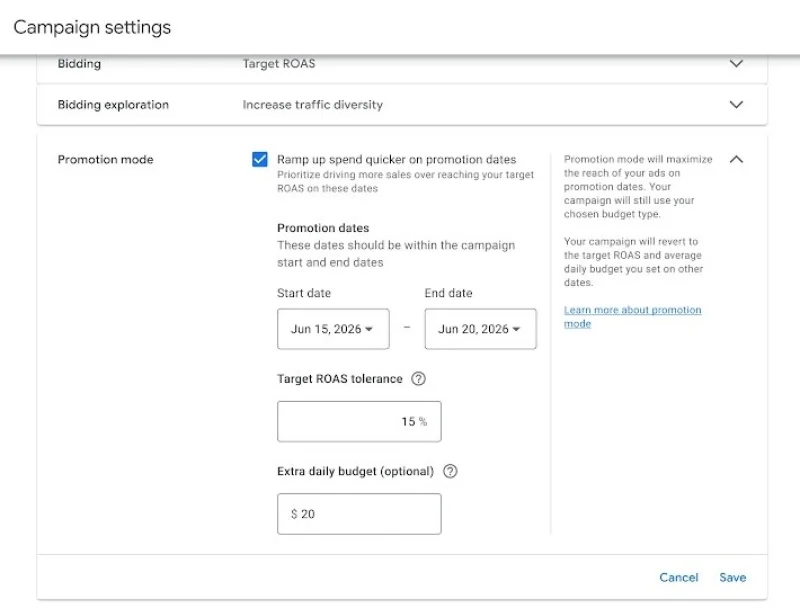
Promotion Mode is in open beta. When it launched on June 15, 2026, Google said it supported only Search and Performance Max campaigns. The English-language documentation does not specify when Shopping campaigns were added. As of November 27, the German, French, and Spanish versions of the page still mentioned only Search and Performance Max.
How the settings work
In Promotion Mode, target ROAS is reduced within a specified tolerance of 5% to 90%. For example, if the original target is 500% and the tolerance is 20%, the new target ROAS will be 400%.
For campaigns with an average daily budget, advertisers can specify an additional amount to spend on each day of the promotion. This setting is unavailable for campaigns with a shared budget: advertisers must increase the shared budget manually.
A target ROAS bidding strategy must be enabled at the campaign level. Portfolio strategies and shared budgets are not supported in the beta; campaigns that have previously run experiments cannot use Promotion Mode either.
Smart Bidding Exploration is automatically enabled for the duration of the promotion, even if the feature was turned off. If it is already enabled, the tolerances for the two settings are added together: in Google’s example, two tolerances of 20% result in 40%.
Performance Max and reporting
According to Google’s English-language documentation, in Performance Max, Smart Bidding Exploration applies to search and Shopping inventory, as well as text and Shopping ads. If a campaign runs primarily on other networks, the effect may be smaller. Some translations of the documentation still say that Exploration starts with search inventory only.
An active promotion appears in campaign settings and tables, the seasonality adjustments menu, and bid strategy and budget reports. Google says these changes are rolling out gradually and may not be available in all accounts.
Preparing for and evaluating a promotion
Scheduling lets advertisers set changes in advance that will be reverted after the sale. Google recommends creating new campaigns at least 48 hours before a promotion starts and allowing existing campaigns to run on their daily budget for at least one full conversion cycle before enabling Promotion Mode.
Once a promotion has started, its start date cannot be changed, and target ROAS and the average daily budget must be adjusted through the Promotion Mode settings. A promotion can be ended early or its end date changed, provided its total duration does not exceed 14 days.
Google also recommends avoiding CPC bid limits and, after a promotion ends, giving Smart Bidding one or two conversion cycles to adapt to significant changes in targets or budgets. When evaluating results in the bid strategy report, the company advises taking the lower target ROAS into account.
Discussion
Sign in or create an account, to join the discussion.